.AU Domain Renewal Rules Changing from 20 May 2026
/Important Update: .AU Domain Renewal Rules Changing from 20 May 2026
Starting 20 May 2026, in accordance with auDA’s requirements, stricter enforcement of Domain renewal requirements are mandatory for all .AU domains.
👉 Your domain will only renew if the ABN (Australian Business Number) or ACN (Australian Company Number) linked to it is current and active.
Previously, outdated details were often overlooked. From this date forward, compliance checks will only occur at renewal, within the 90-day renewal window. If your business information does not match an active entity during this period, renewal will be blocked and your domain may be deleted
What Happens if Your Domain Isn’t Renewed
If your domain fails compliance checks:
Website goes offline – your site becomes inaccessible.
Email disruption – business email accounts stop working.
Loss of visibility – customers, partners, and suppliers cannot reach you.
Risky recovery – restoring a domain in pending delete state may be possible, but it’s not guaranteed and time‑sensitive.
Who Needs to Act
All registrants and business owners with a .AU domain, across all .AU extensions, should review their details.
Even if you registered years ago, your ABN or ACN may have changed due to:
Business restructuring
Ownership transfers
Entity updates or were left to lapse
If your information isn’t up to date, your domain—and everything connected to it—could be at risk.
How to Check and Update Your Domain Details
It only takes a few minutes to secure your domain:
Run a WHOIS Lookup for your domain name.
Confirm it matches your current business entity and is still active with the ATO.
If you find outdated or incorrect details:
Review the email we’ve sent to the reseller’s and/or registrant’s email address.
Follow the instructions provided in that email to update your records.
This quick check ensures your domain renews smoothly and avoids any risk of losing your online presence.
Additional Notes
These enforcement changes currently apply only to ABN and ACN numbers.
Trademark‑based eligibility requirements will be introduced separately in the coming months.
How the Compliance Process Works
Here’s what happens when a domain is flagged for compliance review:
A domain is flagged for compliance review (at registration, post‑registration, transfer, or renewal).
The reseller is contacted to check and review the domain’s eligibility information. If required, an online Registrant Name Change (RNC) request must be submitted or supporting documentation provided.
The submitted details are reviewed against auDA eligibility rules.
The domain is either:
Approved (compliant), or Suspended/Cancelled if requirements are not met.
Frequently Asked Questions (FAQ)
Q1: Why was my domain flagged for compliance?
Domains may be selected for compliance checks to ensure they meet auDA’s eligibility criteria. This can occur randomly or if certain details require verification (e.g., business connection to the domain name).
Q2: How can I check the eligibility information of my .AU domain?
Go to the auDA WHOIS service: https://whois.auda.org.au
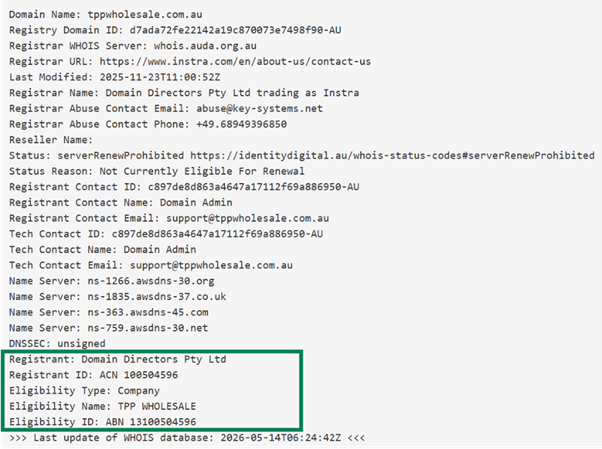
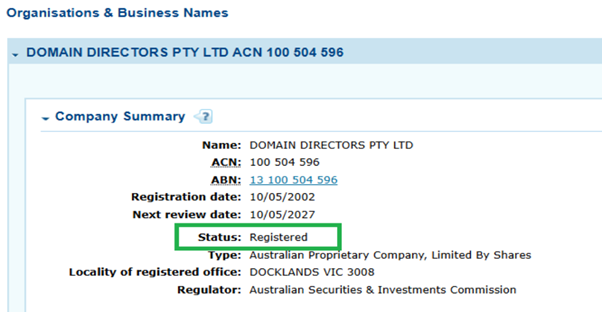
Get the Registrant ID. If you are using an ACN go to ASIC connect.
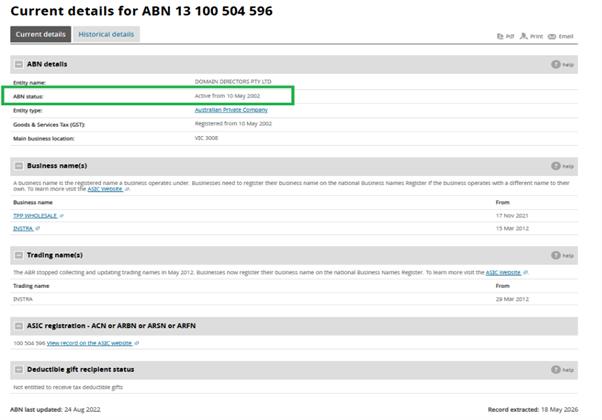
If you are using an ABN, go to ABN Lookup.
Q3: What information might I need to provide?
If an auDA compliance ticket is raised, you may be asked to provide the following:
Business registration details (Active ABN, ACN, or Trademark)
Proof of connection between your domain name and your business or activity
Identification documents (ASIC extracts, Deed of Sale, Trust Deed, etc.)
Q4: How long do I have to respond?
You’ll be given a deadline to submit the required information, which must be completed before the domain expiry date. Please respond promptly to avoid disruption
Q5: What happens if I don’t respond?
If no response is received:
The domain may not be renewed
The domain may be suspended
It may eventually be cancelled
Q6: Will my website or email be affected?
Yes. If a domain is suspended due to non‑compliance, associated services such as websites and email may stop functioning until resolved.
Q7: What makes a domain eligible?
Eligibility depends on the extension:
.com.au / .net.au – Must match or be closely connected to a registered business name, trademark, or activity
.org.au – Must be a non‑Profit or Incorporated Association
.id.au – Must be for personal use only
.au (direct) – Must have a verifiable connection to Australia (as a citizen, resident, or with a business presence) and maintain an active ABN or ACN
Q8: I updated my details in the Console, but WHOIS doesn’t show changes.
Domain contact information differs from eligibility details. Make sure you’ve updated the correct records.
Q9: Can I update my details instead of providing documents?
Sometimes updating registrant details (e.g., ABN or business name) is enough. However, documentation may still be required.
Q10: Is there a fee for compliance checks?
No. Compliance checks are free. A fee will apply if an RNC (Registrant Name Change) is required.
Q11: Aside from RNC (Registrant Name Change), do I have to pay for the domain renewal?
No. An RNC includes a 2-year domain re-registration, which resets the domain’s expiry date.
In addition, once the registrant's name change request is successfully completed, any remaining whole years on the existing registration term (e.g. 1 year and 11 months = 1 whole year) will be carried over to the new registrant.
Q12: How will I be notified?
Notifications are sent via email. Ensure your account and domain contact details are current.
Q13: Who can I contact for help?
Our support team is here to assist: support@thehelpdesk.net.au or call The HelpDesk™ on 1300-085222.