.AU Domain Renewal Rules Changing from 20 May 2026

Important Update: .AU Domain Renewal Rules Changing from 20 May 2026

Starting 20 May 2026, in accordance with auDA’s requirements, stricter enforcement of Domain renewal requirements are mandatory for all .AU domains.

👉 Your domain will only renew if the ABN (Australian Business Number) or ACN (Australian Company Number) linked to it is current and active.

Previously, outdated details were often overlooked. From this date forward, compliance checks will only occur at renewal, within the 90-day renewal window. If your business information does not match an active entity during this period, renewal will be blocked and your domain may be deleted 
 
What Happens if Your Domain Isn’t Renewed

If your domain fails compliance checks:

  • Website goes offline – your site becomes inaccessible.

  • Email disruption – business email accounts stop working.

  • Loss of visibility – customers, partners, and suppliers cannot reach you.

  • Risky recovery – restoring a domain in pending delete state may be possible, but it’s not guaranteed and time‑sensitive.

Who Needs to Act

All registrants and business owners with a .AU domain, across all .AU extensions, should review their details.

Even if you registered years ago, your ABN or ACN may have changed due to:

  • Business restructuring

  • Ownership transfers

  • Entity updates or were left to lapse

If your information isn’t up to date, your domain—and everything connected to it—could be at risk.

How to Check and Update Your Domain Details

It only takes a few minutes to secure your domain:

  1. Run a WHOIS Lookup for your domain name.

  2. Check the ABN or ACN currently linked to your registration.

  3. Confirm it matches your current business entity and is still active with the ATO.

If you find outdated or incorrect details:

  • Review the email we’ve sent to the reseller’s and/or registrant’s email address.

  • Follow the instructions provided in that email to update your records.

This quick check ensures your domain renews smoothly and avoids any risk of losing your online presence.

Additional Notes

  • These enforcement changes currently apply only to ABN and ACN numbers.

  • Trademarkbased eligibility requirements will be introduced separately in the coming months.

How the Compliance Process Works

Here’s what happens when a domain is flagged for compliance review:

  1. A domain is flagged for compliance review (at registration, post‑registration, transfer, or renewal).

  2. The reseller is contacted to check and review the domain’s eligibility information. If required, an online Registrant Name Change (RNC) request must be submitted or supporting documentation provided.

  3. The submitted details are reviewed against auDA eligibility rules.

  4. The domain is either:
    Approved (compliant), or Suspended/Cancelled if requirements are not met.

Frequently Asked Questions (FAQ)

Q1: Why was my domain flagged for compliance? 
Domains may be selected for compliance checks to ensure they meet auDA’s eligibility criteria. This can occur randomly or if certain details require verification (e.g., business connection to the domain name).

Q2: How can I check the eligibility information of my .AU domain? 
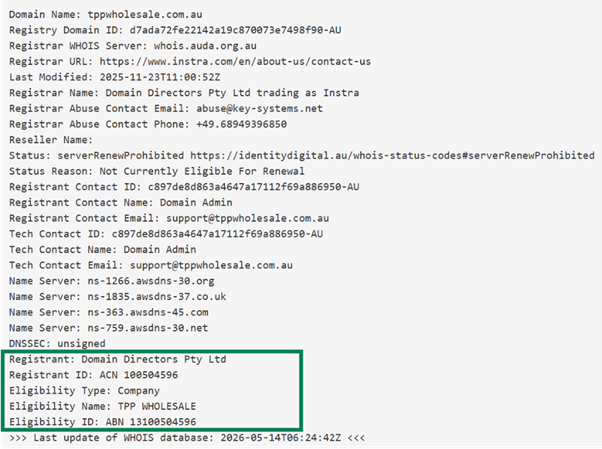
Go to the auDA WHOIS service: https://whois.auda.org.au 

auDA WHOIS service Record Sample.png

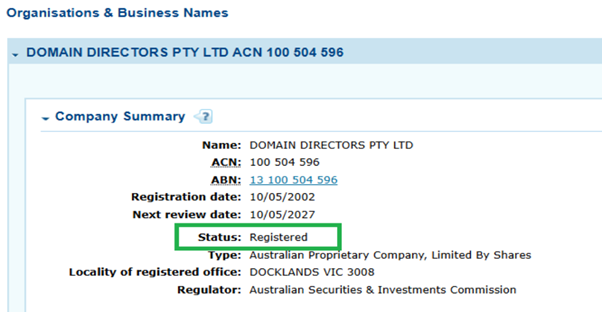
Get the Registrant ID. If you are using an ACN go to ASIC connect

ASIC Connect Record Organisations & Business Names Sample

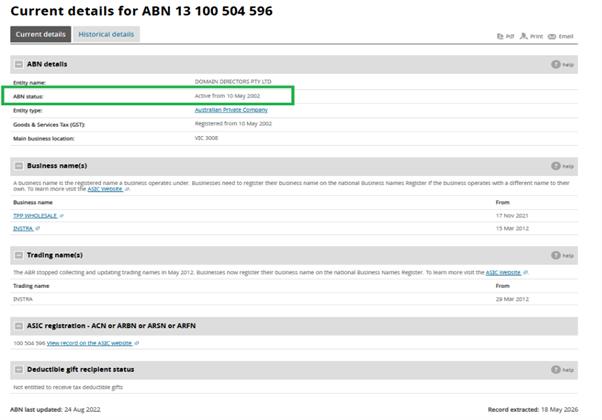
If you are using an ABN, go to ABN Lookup.

ABN Record Sample.png

Q3: What information might I need to provide? 
If an auDA compliance ticket is raised, you may be asked to provide the following:

  • Business registration details (Active ABN, ACN, or Trademark)

  • Proof of connection between your domain name and your business or activity

  • Identification documents (ASIC extracts, Deed of Sale, Trust Deed, etc.)

Q4: How long do I have to respond? 
You’ll be given a deadline to submit the required information, which must be completed before the domain expiry date. Please respond promptly to avoid disruption

Q5: What happens if I don’t respond? 
If no response is received:

  • The domain may not be renewed

  • The domain may be suspended

  • It may eventually be cancelled

Q6: Will my website or email be affected? 
Yes. If a domain is suspended due to non‑compliance, associated services such as websites and email may stop functioning until resolved.

Q7: What makes a domain eligible? 
Eligibility depends on the extension:

  • .com.au / .net.au – Must match or be closely connected to a registered business name, trademark, or activity

  • .org.au – Must be a non‑Profit or Incorporated Association

  • .id.au – Must be for personal use only

  • .au (direct) – Must have a verifiable connection to Australia (as a citizen, resident, or with a business presence) and maintain an active ABN or ACN 

Q8: I updated my details in the Console, but WHOIS doesn’t show changes. 
Domain contact information differs from eligibility details. Make sure you’ve updated the correct records.

Q9: Can I update my details instead of providing documents? 
Sometimes updating registrant details (e.g., ABN or business name) is enough. However, documentation may still be required.

Q10: Is there a fee for compliance checks? 
No. Compliance checks are free. A fee will apply if an RNC (Registrant Name Change) is required.

Q11: Aside from RNC (Registrant Name Change), do I have to pay for the domain renewal?

No. An RNC includes a 2-year domain re-registration, which resets the domain’s expiry date.

In addition, once the registrant's name change request is successfully completed, any remaining whole years on the existing registration term (e.g. 1 year and 11 months = 1 whole year) will be carried over to the new registrant.

Q12: How will I be notified? 
Notifications are sent via email. Ensure your account and domain contact details are current.

Q13: Who can I contact for help? 
Our support team is here to assist:  support@thehelpdesk.net.au or call The HelpDesk™ on 1300-085222.

Why More Australians Are Switching to Aussie Broadband for Faster, More Reliable Internet 🚀

Aussie Broadband - Use Promo Code  18350496  and receive a BONUS $50 Credit to your account!

Use Promo Code 18350496 and receive a BONUS $50 Credit to your account!


When it comes to choosing an Internet Service Provider (ISP) in Australia, not all providers are created equal. While many promise fast speeds and great service, the reality often falls short—especially during peak hours or when you need support the most.

That’s why more Australians—both households and businesses—are making the switch to Aussie Broadband.

🚀 Faster Speeds When It Matters Most

One of the biggest frustrations with many ISPs is slow internet during peak times—right when you need it most.

Aussie Broadband stands out by investing heavily in network capacity. This means:

  • Faster speeds in the evening (when other providers slow down)

  • Smoother streaming with less buffering

  • Better performance for gaming and video calls

  • Reliable connections for cloud apps and remote work

Instead of overcrowding their network, Aussie Broadband ensures customers get the performance they’re paying for.

🇦🇺 Real Australian-Based Tech Support

Tired of calling support and getting scripted responses from overseas call centres?

With Aussie Broadband, you’ll speak directly to Australian-based technicians who:

  • Understand local NBN infrastructure

  • Resolve issues faster and more effectively

  • Provide clear, helpful advice (no scripts)

  • Take ownership of problems until they’re fixed

For both home users and businesses, this level of support is a game changer.

🏠 Benefits for Home Users

Aussie Broadband is built for modern Australian households that rely on fast, stable internet every day.

Perfect for:

  • Streaming in HD or 4K without buffering

  • Online gaming with low latency

  • Working from home with reliable video calls

  • Multiple devices connected at once

  • Business Internet & VoIP Telephone Services

Key Advantages:

  • 🚀 Consistent speeds even during peak hours

  • 📶 Stable connections across all devices

  • 💡 Easy plan upgrades as your needs grow

  • 🔒 No lock-in contracts

Whether you're relaxing, working, or studying—your connection just works.

🏢 Benefits for Business Users

For businesses, internet performance isn’t just convenience—it’s critical to operations.

Aussie Broadband delivers the reliability and support businesses need to stay productive and competitive.

Ideal for:

  • Remote teams and hybrid workplaces

  • Cloud-based software (Microsoft 365, Xero, CRMs)

  • VoIP phone systems

  • Video conferencing and collaboration tools

Key Advantages:

  • ⚡ Reliable uptime to keep your business running

  • 🚀 Strong performance during peak business hours

  • 🧑‍💻 Fast, knowledgeable support when issues arise

  • 🔄 Scalable plans as your business grows

  • 📊 Consistent speeds for mission-critical tasks

When downtime costs money, having a dependable ISP makes all the difference.

💡 No Lock-In Contracts, No Hidden Surprises

Flexibility matters—especially for growing households and businesses.

Aussie Broadband offers:

  • No lock-in contracts

  • Transparent pricing (what you see is what you pay)

  • Easy plan changes anytime

Stay because it works—not because you’re stuck.

💰 Bonus: Get a $50 Credit When You Sign Up

For a limited time, new customers can receive a $50 credit when joining.
NOTE: Use Promo Code 18350496 and receive a BONUS $50 Credit to your account!

It’s a simple way to get started with a better internet experience—while saving money upfront.

🔥 Final Thoughts

Choosing the right ISP isn’t just about price—it’s about performance, reliability, and support when you need it.

With Aussie Broadband, you get:

  • 🚀 Faster, more consistent speeds

  • 🇦🇺 Local Australian-based Tech support

  • 🏠 Great performance for home users

  • 🏢 Reliable solutions for businesses

  • 💡 Honest, transparent pricing

If you’re tired of slow speeds, unreliable connections, or poor support—it might be time to switch.

👉 Ready to experience better internet at home or in your business?
Make the switch to Aussie Broadband today.

Visit:
https://www.aussiebroadband.com.au/

Make sure to use Promo Code: 18350496 to receive a BONUS $50 Credit to your account!

Why Windows 11 PCs Slow Down (and How to Fix It)

Is Your Windows 11 PC Getting Slower Over Time?

If your once-fast computer now feels sluggish, takes longer to start, or struggles with everyday tasks—you’re not alone.

Many Windows 11 users experience performance issues over time. The good news? In most cases, it’s completely fixable.

🚨 Common Reasons Your PC Is Slow

1. Too Many Startup Programs

When your computer boots up, multiple apps may be launching in the background without you realising it. This significantly increases startup time and slows overall performance.

2. Background Processes & Bloatware

Windows 11 often runs numerous background services, including apps you may never use. These consume memory and CPU resources, reducing speed.

3. Built-in Tracking & Telemetry

Windows includes data collection features that run continuously. While intended to improve user experience, they can impact performance and raise privacy concerns.

4. Fragmented or Cluttered System

Over time, temporary files, outdated software, and system clutter build up, making your PC less efficient.

5. Network & Internet Inefficiencies

Incorrect or unoptimised network settings can result in slower browsing, lag, and reduced download speeds.

6. Security Gaps

Outdated configurations can leave your system vulnerable, and some security processes may slow performance if not properly optimised.

⚡ How to Fix a Slow Windows 11 PC

✔ Optimise Startup Programs

Disabling unnecessary startup apps can dramatically reduce boot time and improve responsiveness.

✔ Clean Up Background Processes

Removing unused apps and limiting background activity frees up valuable system resources.

✔ Improve Privacy Settings

Adjusting Windows telemetry and tracking settings not only enhances privacy but can also improve performance.

✔ Perform System Cleanup

Clearing temporary files, unused software, and system clutter often helps your PC run more efficiently.

✔ Tune Network Settings

Optimising your network configuration can lead to faster and more stable internet performance.

✔ Strengthen Security

Applying best-practice security settings protects your system without compromising speed.

🧠 DIY vs Professional Optimisation

While some improvements can be done manually, many optimisations require deeper system knowledge.

Incorrect changes can cause instability or unintended issues, especially when adjusting system services, privacy settings, or network configurations.

🚀 The Smarter Solution: Windows PowerBoost Service

Instead of guessing what to change, our Windows PowerBoost Service takes care of everything for you.

We:

  • Optimise performance for faster speed

  • Reduce unnecessary tracking and data collection

  • Improve system security

  • Enhance internet performance

  • Ensure everything runs smoothly and safely

✨ The Result

A faster, cleaner, and more secure Windows 11 PC—without the frustration of trial and error.

📅 Ready to Speed Up Your PC?

If your computer isn’t performing the way it should, it’s time for a proper optimisation.

👉 Book your Windows PowerBoost Service today and experience the difference.

Telstra Internet Outages after firmware updates on Telstra Modems (Fix)

Recent Telstra firmware updates (notably affecting models like the v7610 and Gen 3 Smart Modems) have caused internet outages, causing routers to lose connection, display error lights, or appear "bricked". Fixes include performing a factory reset via the pinhole button, restarting the device, or calling Telstra to re-flash the firmware.


Immediate Actions to Take:

  • Perform a Factory Reset: Locate the small "Reset" hole on the back of the modem. Press and hold with a paperclip for 15 seconds to force a reset.

  • Power Cycle: Unplug the modem power cable, wait 60 seconds, and plug it back in. Allow 5–10 minutes for it to reconnect and download updated, working firmware.

  • Check Modem Lights: If the light is red or off, the update likely failed. A solid orange/red light indicates a failed connection.

  • Contact Support: If the modem is unresponsive, call 132 999 to report the issue. Affected users have reported that Telstra may need to replace the modem if it is "bricked".

  • Check DNS Settings: Some users found their custom DNS settings were reset to defaults, causing connectivity issues. 


If you are using a Telstra Smart Modem Gen 3, this issue is widespread and often requires a replacement or a technician-pushed update. 

Note: For some users, this issue appeared as a "white light" of death or a failure to connect, often occurring after recent automatic overnight updates. 

Require Support / Help ? We’re here to help!
The HelpDesk™ Your IT Lifeline™  - (TollFree Phone 1300-085222)


#telstra #smartmodem #helpdesk #nbnoutages #telstraoutages #technology #internet #australia


How to contact Microsoft for Telephone Support in Australia

Why Official Microsoft Support Numbers in Australia (13 20 58 (or) 1800-197-503) Often Fail

Many Australians find that calling Microsoft's listed phone numbers lead to automated loops or disconnected lines. This is because Microsoft Personal Accounts are now primarily supported via automated online web forms.

A growing number of Microsoft users across Australia have reported being unable to access timely help for critical issues such as Outlook email outages, account lockouts, and unauthorised debit charges. The frustration is building as customers discover there is no direct phone number for Microsoft technical support in Australia, leaving many without a reliable way to resolve urgent account problems.

The Problem: No Local Microsoft Support Phone Line

When Microsoft customers encounter problems like not being able to send or receive Outlook emails, or finding unexpected debit transactions from Microsoft on their bank accounts, the natural step is to look for a support phone number. Unfortunately, Microsoft has discontinued direct local phone support for most consumer and small business users in Australia.

Instead, customers are often redirected to online forums, virtual chatbots, or delayed email support channels — options that can be frustratingly slow or unable to handle complex issues involving billing and account verification.

The Impact on Australian Users

Without accessible support, many users are left:

  • Locked out of their Microsoft or Outlook accounts for days or weeks

  • Unable to send or receive important / critical emails

  • Struggling to identify or stop automatic Microsoft debit charges

  • Worried about data security and account access

This lack of local service has created a serious gap for both personal and business users who rely on Microsoft products for daily communication and operations.

To bridge this gap, The HelpDesk™ provides professional, phone-based Microsoft Account Support across Australia and New Zealand.

Whether you need assistance with a locked Microsoft account, missing Outlook emails, or debit charges from Microsoft that you can’t control, The HelpDesk™ offers real human support — not automated systems.

Our team has been serving Australians for over 27 years, helping customers regain access to their Microsoft services quickly, safely, and securely.


Why Choose The HelpDesk™ for Microsoft 365 IT Support?

  • Approved Australian Microsoft Partner since 1998

  • A Trusted Australian Technology Company for over 27 years

  • Local Australian-based IT support team

  • Fast assistance with Outlook and Microsoft Account issues

  • Transparent pricing — not a free service, but a professional one

  • Support available by phone - Talk to a human!

  • Deal with the same IT Support Technician every time you call.

  • Simply Call 1300-085222 (or) +61 7 53497000

If you’re unable to send or receive emails, can’t access your Microsoft account, or have unexplained Microsoft charges — we can help.
Get real support from an experienced HelpDesk™ Microsoft expert, talk to a human now.

Book Microsoft Account Support Online Here: www.thd.net.au/microsoft-account-support

 
Get Microsoft account help, troubleshoot sign in issues, keep your account secure, and manage your Microsoft account.
 

⚠️ Attention Windows PC Users: Important Info About the Latest Microsoft Update (KB5063060) ⚠️

Microsoft recently released the June 2025 out-of-band update KB5063060 for Windows 11 (version 24H2) to address issues with the Easy Anti-Cheat service used in games like Fortnite. However, some users are reporting problems after installing this update. Here’s what you need to know:

Common Issues Reported:

  • Installation Failures: The update may fail to install, showing errors like 0x800f0922, 0x80070002, 0x80070306, 0x800f0991, or 0x800705b9. Some users report the update getting stuck at 38% or 0% during installation.

  • System Instability: A few users have experienced random freezes, system crashes, or even boot loops requiring repair.

  • Network Issues: Some business users have reported slow or unstable internet connections after installing the update on company PCs.

  • Admin Mode Problems: In enterprise environments, some PCs can’t enter audit/admin mode (Ctrl+Shift+F3) without putting the device to sleep and waking it first.

  • Blurry Text in Browsers: Users with East Asian languages (Chinese, Japanese, Korean) may see blurry or unclear text in Chromium-based browsers (e.g., Edge, Chrome) at 96 DPI (100% scaling). Microsoft suggests increasing scaling to 125% or 150% as a temporary fix.

Other Potential Issues:

  • Taskbar and Explorer Problems: Some users reported System Explorer crashes, rearranged taskbar icons, or an unexpected “tools” menu appearing after installing the update, possibly due to third-party customization tools like Explorer Patcher or Windhawk. Uninstalling these tools and running a Windows recovery may resolve this.

  • Game Compatibility: While KB5063060 fixes Easy Anti-Cheat issues, there’s a known bug with Intel Alder Lake+ and vPro chips causing crashes in games using this service. Check for game updates with newer Easy Anti-Cheat versions to mitigate this.

  • General Performance: A few users noted slower performance, such as delayed Office installations, after applying the update.

What You Can Do:

  1. Try Manual Installation: If the update fails via Windows Update, download the .msu file from the Microsoft Update Catalog and install it manually.

  2. Run Troubleshooters: Use the Windows Update Troubleshooter (Settings > System > Troubleshoot > Other troubleshooters)

  3. Uninstall the Update: If issues persist, go to Settings > Windows Update > Update History > Uninstall updates, select KB5063060, and uninstall.

  4. Backup First: Before uninstalling, back up your importanta data to avoid data loss in case of a system crash.

  5. Wait for a Fix: If you’re not affected by Easy Anti-Cheat issues, consider pausing updates until Microsoft addresses these problems in the next patch.

Stay Informed: Microsoft is investigating these issues and may release fixes soon. Follow @WindowsUpdate on X or check the Windows release health dashboard for updates.

Have you installed KB5063060? Share your experience in the comments below! 👇 Stay safe and keep your PC running smoothly! 💻

#WindowsUpdate #Microsoft #KB5063060 #TechTips #TheHelpDesk #Windows11

The HelpDesk™ Your IT Lifeline™ since 1998 ( a Commerce Services Australia Company ) 📞 Tollfree 1300-085222 | +61 7 5349-7000

How to configure the Fastest Windows® 11 PC in Australia?

When it comes to speed, power, and performance, Australians are no strangers to pushing boundaries. But who can truly claim the title of having the fastest Windows PC computer in the country? Let’s explore this fascinating question.

Defining "Fastest" in Computing

Speed in a computer can mean many things—lightning-fast processing for gaming, data-crunching capabilities for professionals, or instant boot times for everyday users. But one thing is certain: achieving top-tier performance requires expert design & engineering, cutting-edge components, the knowledge of configurating Microsoft® Windows® Operating Systems, Web Browsers (Chrome, Edge, Firefox etc.) and a deep understanding of the end user’s needs.

Why Performance Matters

Whether you’re a gamer, a video editor, or running a business, the speed of your computer can make or break your productivity. In competitive gaming, milliseconds can decide victory. For content creators, rendering speed determines how quickly projects come to life. For businesses, fast systems mean better efficiency and more opportunities to innovate.

Meet The HelpDesk™: Australia’s Experts in High-Performance Computing

If you’re in the market for the fastest computer in Australia, look no further than The HelpDesk™. With over 26 years of IT expertise, we specialize in custom-built PCs that deliver unparalleled speed and reliability.

Our team doesn’t just configure computers—we tailor them to your exact needs. From advanced processors and GPUs to lightning-fast SSDs, every component is handpicked to ensure maximum performance.

Why Choose The HelpDesk™?

  • Custom Builds: Designed for your specific workload, whether it’s gaming, creative work, or professional business use.

  • Local Expertise: Configured in Australia by experienced technicians who understand exactly how to squeeze the most from operating system and software apps..

  • Support You Can Trust: With ongoing IT support, we’ve got your back long after delivery.

Curious to see what we can do? Visit our page here and discover how we can help you experience the fastest computing in Australia.

The Verdict

So, who has the fastest computer in Australia? It could be you—with a little help from The HelpDesk™. Whether you're upgrading or building from scratch, our custom solutions ensure you’ll always be ahead of the curve.

Ready to experience the speed? Contact us today and let’s start building and configuring your dream machine.

The HelpDesk™ Your IT Lifeline™ since 1998 ( a Commerce Services Australia Company ) 📞 Tollfree 1300-085222 | +61 7 5349-7000

Upgrading Your Computer from Windows 10 to Windows 11, No Need for a New PC

Upgrading to Windows 11 is an exciting opportunity for many Windows 10 users. With its sleek design, enhanced features, and improved performance, Windows 11 offers a modern computing experience. However, the question often arises: Do you need a new computer to make the switch? You may see the message: “This pc doesn't meet the requirements for Windows 11”

The good news is that for most users, a new computer isn’t necessary. In this blog post, we’ll guide you through the key requirements for Windows 11 and show you how many existing PCs are fully capable of running the new operating system. Utilising our IT knowledge over 26 years and proprietary technology we have enjoyed a 100% Success rate in Windows 10 to Windows 11 Device upgrades.

Understanding Windows 11’s Requirements

Microsoft introduced some updated system requirements for Windows 11, but they’re not as intimidating as they might seem at first glance. Here's what you need:

  • Processor: A 1GHz or faster CPU with at least 2 cores (64-bit). Most modern processors from the last 5-7 years qualify.

  • RAM: At least 4GB. If your computer is low on RAM, upgrading is often simple and affordable.

  • Storage: A minimum of 64GB. Many computers already exceed this, and external drives or SSD upgrades can help if needed.

  • Graphics: DirectX 12-compatible GPU or integrated graphics.

  • Firmware: UEFI with Secure Boot capability.

  • TPM 2.0: This Trusted Platform Module ensures security and is available on many computers manufactured since 2016.

If you’re unsure whether your PC meets these requirements, Microsoft provides a free tool called the PC Health Check App. This app will quickly assess your system’s compatibility.

When Is a New PC Necessary?

A new computer might be needed only if your current device is:

  • Over a decade old and struggles with basic tasks.

  • Missing critical hardware components like TPM 2.0 or UEFI support.

  • Unable to meet the performance expectations of modern software.

If you’re in this situation, investing in a new computer will ensure you can enjoy all the features of Windows 11 smoothly.

Upgrading Your Current Computer

For the majority of Windows 10 users, a few adjustments can prepare your PC for Windows 11:

  1. Enable TPM 2.0 and Secure Boot
    Many computers already have TPM 2.0 but may require you to enable it in the BIOS settings. Similarly, Secure Boot might be disabled but can be activated easily.

  2. Upgrade RAM or Storage
    If your computer is low on RAM or storage, upgrading these components can make a significant difference in performance and ensure compatibility.

  3. Check for Driver Updates
    Before upgrading, visit your manufacturer’s website to download the latest drivers for your hardware.

  4. Perform a Clean Install (Optional)
    While not mandatory, a clean installation of Windows 11 can eliminate software clutter and improve performance.

Why Upgrade to Windows 11?

Windows 11 isn’t just a visual upgrade. Here are some benefits:

  • Improved Productivity: Snap Layouts and enhanced multitasking tools.

  • Enhanced Security: Advanced protections with TPM 2.0 and Secure Boot.

  • Gaming Performance: DirectStorage and AutoHDR for better gaming experiences.

  • Seamless Updates: A more efficient update system.

Conclusion

Upgrading from Windows 10 to Windows 11 doesn’t have to be daunting or expensive. With a little preparation, most PCs from the last several years are more than ready to make the switch. By checking compatibility, enabling key features, and making small upgrades if necessary, you can enjoy the benefits of Windows 11 without buying a new computer.

If you need assistance with the upgrade or want to assess your PC’s compatibility, The HelpDesk™ is here to help! With over 26 years of experience, we specialize in IT solutions that make your tech transitions seamless.

Are you ready to step into the future with Windows 11? Let us show you how you can save $$$!

The HelpDesk™ Your IT Lifeline™ since 1998 ( a Commerce Services Australia Company ) 📞 Tollfree 1300-085222 | +61 7 5349-7000 | m 0404-114444

Rock Your World with Pearl Jam & Supercharge Your PC: Here’s How You Can Win Big!

Introduction:

Hey, Pearl Jam fans! 🎸 Are you ready to experience the raw energy of Pearl Jam live on their “Dark Matter World Tour” 2024? Imagine the thrill of hearing "Alive," "Jeremy," and all your favorite hits under the stars on the Gold Coast. But what if we told you that you could score tickets to this epic event AND boost your computer's performance at the same time? Yes, you read that right!

The Ultimate Fan Experience:

Pearl Jam’s music is legendary, their concerts unforgettable. Whether you’ve been following them since their debut album Ten or you’re a new fan just discovering their incredible catalog, seeing them live is a bucket list event. The “Dark Matter World Tour” promises to be one of their most explosive performances yet, with stunning visuals, powerful sound, and of course, that classic Pearl Jam intensity.

But here’s the best part: You have a chance to be there in person, rocking out with fellow fans at the Gold Coast show!

Here’s How You Can Win Tickets:

To celebrate the launch of Pearl Jam’s world tour, The HelpDesk™ is offering a special promotion. When you service your PC with our RapidBoost OS Accelerator Service, you’ll be entered to win a pair of tickets to see Pearl Jam live on the Gold Coast in 2024. It’s a win-win for any Pearl Jam fan who’s also tired of dealing with a sluggish computer.

Why You Should Service Your PC (and How It Benefits You):

As much as we all love rocking out to Pearl Jam, nothing kills the vibe like a slow, unresponsive PC. Whether you’re streaming live shows, editing your own music, or just trying to keep up with the latest Pearl Jam news, a fast and efficient computer is essential.

Here’s what our RapidBoost OS Accelerator Service can do for you:

  • Speed Up Your System: Experience faster boot times, quicker load speeds, and seamless multitasking. Say goodbye to frustrating delays!

  • Improve Internet Performance: Enjoy smooth streaming of your favorite Pearl Jam videos and music with optimized internet settings.

  • Extend the Life of Your PC: Regular maintenance can prevent costly repairs and keep your system running like new.

By servicing your PC with The HelpDesk™, you’re not just entering to win concert tickets—you’re investing in a better computing experience that lets you enjoy more of what you love.

A Deal You Don’t Want to Miss:

This offer is too good to pass up. Here’s a quick rundown of what you need to do:

  1. Book Your Service: Schedule your RapidBoost OS Accelerator Service with The HelpDesk™ between now and Monday, September 30th, 2024, at 17:00 AEST.

  2. Enter to Win: Once your service is completed, you’re automatically entered into the drawing for the Pearl Jam tickets.

  3. Mark Your Calendar: The winner will be drawn on Tuesday, October 8th, 2024, and notified via phone and email.

Why Pearl Jam Fans Can’t Miss This:

Pearl Jam has always been about more than just music—they’re a way of life, a community. And what better way to celebrate that community than by upgrading your tech and possibly winning tickets to see them live?

So, whether you’re a die-hard fan or new to the scene, don’t miss out on this incredible opportunity. Get your PC in top shape, enter the giveaway, and you could be on your way to the Gold Coast for a night you’ll never forget!

Conclusion:

Ready to rock out with Pearl Jam? Don’t let a slow PC hold you back. Book your service today, and you might just find yourself singing along with Eddie Vedder and the crew live in 2024. 🎶

👉 Book Your Service Now: https://www.thd.net.au/pearl-jam-promotion

Rock on, and good luck! 🤘

The HelpDesk™ Your IT Lifeline™ since 1998 ( a Commerce Services Australia Company ) 📞 Tollfree 1300-085222 | +61 7 5349-7000 | m 0404-114444

Microsoft OneDrive Error "General exception while processing"

Introduction

Recently, Microsoft OneDrive users have been encountering a perplexing issue labeled as "General exception while processing," impacting access to their personal cloud server accounts globally. This issue affects both the OneDrive desktop applications and access through web browsers, according to reports from The HelpDesk™ testing.

Importance of Keeping a Copy on Your Device

The incident highlights a crucial lesson for all OneDrive users: always keep a copy of your important files on your local device. Here’s why this practice is essential:

  1. Access Reliability: By having local copies of your files, you mitigate the risk of being unable to access them due to server issues or connectivity problems.

  2. Offline Access: Storing files locally ensures you can work on them even without an internet connection, which is particularly useful in remote or unstable network environments.

  3. Data Security: Local copies provide an additional layer of security against potential data loss or breaches that could occur in cloud services.

Adjusting Your OneDrive Configuration

To ensure you’re prepared for any service interruptions or access issues like the recent "General exception while processing," consider these steps:

  • Sync Important Folders: Use the OneDrive desktop application to sync crucial folders automatically to your local device.

  • Regular Backups: Implement a routine backup strategy that includes both cloud storage and local backups to safeguard against data loss.

  • Stay Informed: Keep an eye on official announcements and updates from Microsoft regarding service interruptions or changes that could affect your access.

Conclusion

While cloud storage services like OneDrive offer unparalleled convenience and accessibility, incidents like the recent service disruption underscore the importance of maintaining local backups. By taking proactive steps to keep copies of your files on your device, you ensure continuous access to your important data, even during unforeseen technical challenges.

For assistance with configuring your OneDrive setup or establishing a robust backup strategy, feel free to reach out to our experts at The HelpDesk™. We’re here to help you navigate through any challenges and keep your data secure.

Ensure your OneDrive configuration includes local backups to safeguard your important files. Book Now thru The HelpDesk™ for personalized assistance in setting up and securing your OneDrive today.

The HelpDesk™ Your IT Lifeline™ since 1998 ( a Commerce Services Australia Company ) 📞 Tollfree 1300-085222 | +61 7 5349-7000 | m 0404-114444

Warning for Australian PC Users about the Latest Microsoft Windows 11 Scam .

🚨 Urgent Alert for All Microsoft Windows PC Users! 🚨

Hi everyone! We've just released a must-watch video about a new Windows 11 scam that's making the rounds online. These scammers are getting sneakier, and it's more important than ever to stay informed and protect yourself.

🔍 In this video, we cover:
- How the scam works.
- Key red flags to look out for.
- Essential safety tips to keep your data secure.
- What to do if you've been targeted.

🎯 Key Tip: Always remember, the ONLY official Microsoft support number in Australia is 13 20 58. Don't get tricked by fake numbers!

Stay one step ahead of the scammers and keep your information safe. Click the link below to watch the full video and learn how to protect yourself! ⬇️

📹 Watch Now on YouTube https://youtu.be/OB_bb254BU4

👍 If you find this video helpful, please like, share, and subscribe for more tech tips and updates. Let's spread the word and keep everyone safe online!

The HelpDesk™ Your IT Lifeline™ since 1998 ( a Commerce Services Australia Company ) 📞 Tollfree 1300-085222 | +61 7 5349-7000 | m 0404-114444

What do you do if your business is transitioning to cloud computing?

Assess Needs

 Before diving into cloud computing, it's crucial to assess your current network's capabilities and future requirements. Determine which services and data are most critical to your business operations and consider their compatibility with cloud solutions. Evaluate the bandwidth needs to ensure your network can handle increased cloud traffic. Additionally, identify any regulatory compliance standards that must be adhered to when data is stored off-premises. This preparatory step is essential for a seamless transition.

 Plan Migration

 Once you've assessed your needs, develop a detailed migration plan. This should include a timeline, the selection of cloud service providers, and the determination of which parts of your network will move to the cloud first. Prioritize applications that will benefit most from cloud scalability and flexibility. It's also wise to consider a phased approach, starting with non-critical systems to mitigate risk. During this stage, ensure that your team is trained and ready to manage new cloud-based tools and services.

 Secure Your Data

 Security in the cloud is non-negotiable. You must ensure that your data is protected during and after the transition. Familiarize yourself with the cloud provider's security protocols and confirm they align with your organization's policies. Implement encryption for data at rest and in transit, and use robust authentication and access control measures. Regularly review and update your security practices to address emerging threats. Keeping your data secure in the cloud is a continuous process that demands vigilance.

 Monitor Performance

 Monitoring network performance is vital during the transition to cloud computing. Establish metrics to evaluate the performance of your cloud services against your on-premises infrastructure. Use network monitoring tools to track bandwidth usage, latency, and the availability of cloud applications. Monitoring helps in identifying potential issues early, allowing you to address them proactively. It also provides insights into whether the cloud services are meeting your expectations and business needs.

 Manage Ongoing Costs

 Cost management is a significant aspect of transitioning to cloud computing. Understand the pricing models of your chosen cloud services and monitor your usage to avoid unexpected expenses. Implement cost-control mechanisms like automated alerts when you're approaching budget limits. Regularly review your cloud expenditures to ensure you're optimizing resources and getting the best value for your investment. Effective cost management ensures that your move to the cloud does not lead to financial surprises.

 Train Your Staff

 Finally, invest in training your staff to manage the new cloud environment efficiently. Cloud computing often requires new skills and knowledge, so providing the necessary training is critical for a successful transition. This includes understanding cloud-specific security practices, managing virtualized network resources, and using new management tools provided by cloud vendors. Well-trained staff will be better equipped to handle the challenges of a cloud-based network and contribute to its optimal functioning.

 Here’s what else to consider

 Ensure EVERY user account is protected by Multifactor Authentication (MFA). This guarantees you will get the best protection and significantly reduce the risk of getting hacked or data breaches.

The HelpDesk™ Your IT Lifeline™ since 1998 ( a Commerce Services Australia Company ) 📞 Tollfree 1300-085222 | +61 7 5349-7000 | m 0404-114444

Customer Dissatisfaction, Unreliable Tech Support, Is this the end of Telstra?

Greetings, tech enthusiasts and frustrated Telstra consumers alike,

Today, we address a topic that's been circulating within the tech community and beyond: the quality of Telstra's technical support services. As an organization dedicated to supporting and improving user experiences with technology, The HelpDesk™ has observed a growing sentiment of dissatisfaction among Telstra's internet and mobile phone customers in Australia.

Let's delve into the heart of the matter. Telstra, being a leading telecommunications provider in Australia, has long been entrusted with delivering reliable services and responsive customer support. However, recent feedback paints a picture of below-standard, poor, and frustrating technical support experiences for users.

 **The Rising Frustration**

Consumers rely on Telstra not just for connectivity but also for prompt and effective assistance when issues arise, this is when Telstra customers actually need support the most. Unfortunately, numerous reports highlight extended wait times, inadequate resolutions, and poor communication as common issues faced by Telstra customers seeking technical support when an outage occurs.

Imagine being in the midst of a critical work project, only to encounter an internet or phone system outage with no timely resolution in sight. Or attempting to troubleshoot a mobile phone issue, only to be met with scripted responses and unhelpful advice. These scenarios are more than just inconveniences; they impact productivity, communication, business functionality, profitability and severely damages trust in the Telstra services provided.

Want to buy a new mobile phone or Telstra internet service? No problem! You’ll get put straight through at the speed of light! However, if you experience an internet or other outage… Good luck with that, regular instances of the inability to promptly get through to a Telstra Technician who can assist with fast resolution or helpful advice that results in the successful speedy restoration of services. Welcome to the far que ☹

 **A Call for Change**

 At The HelpDesk™, we believe that technical support should be responsive, knowledgeable, and committed to solving users' problems swiftly. When a telecommunications giant like Telstra falls short in these areas, it raises valid concerns about the company's commitment to customer satisfaction.

The question arises: Is this the end of Telstra as we know it? While it's premature to predict the demise of such a prominent player in the industry, it's undeniable that action is needed to address these shortcomings. Telstra has the opportunity to reevaluate its support strategies, invest in training and resources, and prioritize customer-centric solutions.

 **Looking Ahead**

In the spirit of constructive feedback, we urge Telstra to listen to its customers and take proactive steps towards improving its technical support and system restoration services. Transparency, responsiveness, and a genuine commitment to resolving issues are key to rebuilding trust and loyalty among consumers.

To our readers and fellow tech enthusiasts, we invite you to share your experiences and thoughts on this matter. Have you encountered challenges with Telstra's technical support? What changes would you like to see implemented to enhance the overall customer experience?

Let's keep the dialogue open and advocate for improvements that benefit us all.

Until next time,

The HelpDesk™ Team

The HelpDesk™ Your IT Lifeline™ since 1998 ( a Commerce Services Australia Company ) 📞 Tollfree 1300-085222 | +61 7 5349-7000 | m 0404-114444

🚀 Welcome to the future of IT Sales & Support, Australia's Best Value Business IT Support

💡 Get started with a HelpDesk™ IT support subscription today! 🛠️

In the dynamic landscape of modern business, maintaining seamless IT operations is paramount. Yet, navigating through day-to-day computer troubles can be a real obstacle. The HelpDesk™ is your qualified, Australian Based IT Technical Support company for both Windows PC’s & MacOS! 🚀💻

Why Choose The HelpDesk™ for your IT Technical Support?

1. 🛠️ Tailored Australian-Based Support: Enjoy the convenience of Australian-based technical support for Microsoft, Google and Apple platforms. Our local experts are here to assist you during standard business hours, Monday to Friday from 9 AM to 5 PM. Say goodbye to time zone hassles and hello to personalised IT Support assistance!

2. 💰 Cost-Effective Solutions: The HelpDesk™ offers budget-friendly IT support subscriptions designed to address your everyday computer issues without breaking the bank. No more unexpected expenses disrupting your financial plans!

3. 🚀 Streamlined Operations: Focus on your core business activities while we handle the technical side of things. With The HelpDesk™ by your side, you can enjoy streamlined operations and enhanced productivity, knowing that your IT needs are in capable hands.

4. 🔒 Enhanced Security: Safeguard your business data from cyber threats with our robust security measures and regular system updates. Rest assured, your digital assets are protected by our proactive approach to digital cybersecurity.

5. 📈 Scalability: Whether you're a startup or a well-established enterprise, our IT solutions are scalable to meet your evolving needs. As your business grows, so does our support!

6. 📈 Personal Qualified IT Technician: Deal with the same support Account Manager every time you call, that’s just one of the benefits of the HelpDesk™ Business Advantage™.

Don't allow technology issues to restrict your business growth and cause customer dissatisfaction.

Improve your business with The HelpDesk™' IT support subscription and bid farewell to day-to-day computer and technology headaches. Invest in uninterrupted operations and witness your business reach new heights! 💼

Empower your business with reliable, expert IT support from The HelpDesk™ – Australia's trusted IT partner with over 26 years of experience.

💡 Get started with a HelpDesk™ IT support subscription today! 🛠️

The HelpDesk™ a Commerce Services Australia Company 📞 Tollfree 1300-085222

The Awesome Benefits of Registering Your Own Domain Name.

Registering a domain name offers several benefits that can be advantageous for individuals and businesses alike.
Click Here to watch a YouTube video that explains in simple terms about how to register an .au Domain.
Listed below are some of the main benefits:

1. Professionalism: Having a personalized email address with your own domain (e.g., yourname@yourdomain.com.au) adds a level of professionalism and credibility to your online presence. It gives the impression that you are serious about your identity and brand.

2. Branding: A custom domain email allows you to reinforce your brand identity with every email you send. It promotes brand recognition and helps establish a consistent image in the minds of your recipients.

3. Control and Ownership: By registering a domain, you have full control over your email accounts. Unlike free email services like Gmail or Yahoo, you are not subject to the limitations or potential changes in policies imposed by the email service provider.

4. Security: Using a domain-specific email address can enhance security. You can implement more robust security measures, like two-factor authentication, encryption, and access controls, to protect your email communications.

5. Data Privacy: With your own domain, you can be more confident about your data privacy. Free email providers often scan emails to serve targeted ads, while having a custom domain gives you more control over how your data is used.

6. Professional Email Features: Many domain registrars and email hosting services offer advanced features like group email aliases, mail forwarding, autoresponders, and custom email signatures, which can streamline your communication processes.

7. Scalability: If you have multiple employees or team members, using a domain-specific email system makes it easier to manage and scale your email accounts efficiently.

8. Flexibility: You can create multiple email accounts on your domain for different purposes or departments, helping you organize communications more effectively.

9. Consistency: A domain-specific email address remains consistent even if you change internet service providers or email hosting providers, preventing the need to notify everyone about an email address change.

10. Improved Deliverability: Some email service providers might view emails from custom domains as more trustworthy, potentially leading to better deliverability rates and reduced chances of landing in spam folders.

Overall, registering a domain for email accounts offers numerous benefits, contributing to a more professional image, enhanced security, and greater control over your online communications. It's a worthwhile investment for both individuals and businesses looking to strengthen their online presence.
For more information visit:

Still have questions or want to take the next step and get started? Visit www.thd.net.au/links for more additional information or call us for personal and Business Domains, Web Hosting, Email and General Computer & IT Sales & Support Services.

The HelpDesk™ Your IT Lifeline™ since 1998 ( a Commerce Services Australia Company ) 📞 Tollfree 1300-085222 | +61 7 5349-7000

Microsoft 365 Licenses Made Easy, with Local Australian IT Tech Support

Looking for a reliable way to get your Microsoft 365 licenses? The HelpDesk™ provides a streamlined solution, allowing you to acquire all the Microsoft 365 licenses your business needs at the same price as buying directly from Microsoft, and in some cases, even cheaper! This allows you to simplify your purchasing process and manage all your IT needs through a single, trusted partner. By leveraging The HelpDesk™ you not only get the essential software for your team, but you also gain access to expert Australian based IT support and a unified billing system, making it easier than ever to equip your business with the tools needed for success and improved effective configuration of your Microsoft 365 products..

Unlock the full potential of Microsoft's technologies with a trusted local partner. Choosing a certified Microsoft 365 provider like The HelpDesk™ ensures tailored solutions and expert local support right here in Australia. Discover the distinct advantages of partnering locally to propel your business forward in this insightful blog post.

1. Buy Microsoft 365 for the same price!

The HelpDesk™ provides a streamlined solution, allowing you to acquire all the Microsoft 365 licenses your business needs at the same price as buying directly from Microsoft, and in some cases, even cheaper! This allows you to simplify your purchasing process and manage all your IT needs through a single, trusted Microsoft partner.

2. Prompt Local Australian Microsoft Support: (Need help now? Click Here)

Having a local Microsoft Partner means having them within reach whenever you need assistance. Time zone differences can create challenges when partnering with companies from other countries, as you may face delays in communication and support. By choosing a local partner, you can benefit from prompt on-site support, quick response times, and easier collaboration, ultimately leading to faster issue resolution and improved productivity.

3. Tailored Solutions to Meet Local Needs:

One of the key advantages of working with The HelpDesk™ as a Microsoft Reseller is their deep understanding of the local business landscape. They are familiar with the unique challenges and requirements specific to Australia, whether it's compliance regulations, industry standards, or cultural nuances. This knowledge enables us to deliver tailored solutions that align with your organization's goals, ensuring optimal efficiency and productivity.

4. In-Depth Industry Expertise:

Local Australian companies specializing in Microsoft technologies often possess in-depth industry expertise. They have a finger on the pulse of local market trends and understand the specific needs of businesses operating in different sectors. This knowledge allows them to provide valuable insights, implement best practices, and offer customized solutions that are tailored to your industry. By leveraging their expertise, you can maximize the potential of Microsoft technologies and gain a competitive advantage.

5. Familiarity with Local Regulations and Compliance:

Australia has its own set of regulations and compliance standards that businesses must adhere to. By partnering with a local company, you benefit from their knowledge and experience in navigating these requirements. They can guide you through the complexities of data protection, privacy laws, and industry-specific regulations, ensuring your technology solutions are compliant and secure.

6. Supporting the Local Economy:

Choosing a local Australian company as your Microsoft Partner also contributes to the growth of the local economy. By supporting local businesses, you foster job creation and help build a stronger community. Additionally, a local company's success is often tied to its reputation within the local market, so you can expect a high level of commitment and dedication to delivering exceptional “old school” service and customer satisfaction.

7. Your own Personal HelpDesk™ Account Manager

Imagine having you own personal HelpDesk™ Account Manager. An experienced senior HelpDesk™ Technician at your beck and call anytime you have any M365 technical issues, the same person every time! It’s just one of the many benefits of the HelpDesk™ Business Advantage™ No extra charges, you pay the same Subscription fees for your Microsoft 365 Licenses as buying directly from Microsoft. Australian Based IT Support during business hours M-F 9-5.

Conclusion:

Partnering with The HelpDesk™ as your Microsoft Partner offers numerous advantages that can significantly impact your business's success. From tailored solutions and prompt support to industry expertise and compliance knowledge, we are uniquely positioned to understand and meet the specific needs of Australian businesses. Moreover, by choosing a local partner, you contribute to the growth of the local economy and establish a long-term relationship built on trust and shared goals. So, when it comes to Microsoft solutions, consider the benefits of working with a local Australian company, unlock the true potential of your business.

Get started immediately with Microsoft 365 from The HelpDesk™ Australia by visiting us at: www.thehelpdesk.net.au

The HelpDesk™ Your IT Lifeline™ since 1998 ( a Commerce Services Australia Company ) 📞 Tollfree 1300-085222 | +61 7 5349-7000 | m 0404-114444

Cloud Backup is easier than you think! - Google Drive, Microsoft OneDrive, Dropbox

The HelpDesk™ Secure Cloud Account Setup appointment type is designed to ensure the establishment of a robust and protected cloud-based infrastructure for your organization. During this appointment, our team of experts will guide you through the necessary steps to create and configure your cloud account securely. This process involves implementing industry best practices and employing advanced security measures to safeguard your data and systems.

Key Steps and Activities:

1. Needs Assessment: We will conduct an initial assessment to understand your specific requirements, goals, and compliance needs regarding your cloud infrastructure.

2. Account Creation: Our experts will assist you in creating a new cloud account or optimizing an existing one based on your organization's preferences and security guidelines.

3. Access Controls: We will help you establish stringent access controls and permission settings to ensure that only authorized personnel can access and manage your cloud resources.

4. Encryption and Key Management: We will guide you through the process of implementing robust encryption mechanisms and effective key management practices to protect your data both at rest and in transit.

5. Multi-Factor Authentication (MFA): Our team will assist you in setting up MFA, an additional layer of security that adds an extra authentication factor beyond passwords, significantly reducing the risk of unauthorized access.

6. Network and Firewall Configuration: We will help you design and implement secure network configurations and firewall rules to prevent unauthorized access attempts and potential data breaches.

7. Monitoring and Logging: Our experts will show you how to enable comprehensive monitoring and logging features, allowing you to track and analyze activities within your cloud account for early detection of security threats.

8. Training and Best Practices: We will provide training sessions to educate your team on secure cloud practices, emphasizing techniques to mitigate common security risks and promoting a security-conscious culture within your organization.

By choosing the HelpDesk™ Secure Cloud Account Setup appointment, you can ensure that your cloud infrastructure is established and functional with the highest level of security, enabling you to leverage the benefits of cloud computing while safeguarding your valuable data and digital assets.

The HelpDesk™ Your IT Lifeline™ since 1998 ( a Commerce Services Australia Company ) 📞 Tollfree 1300-085222 | +61 7 5349-7000

Strengthen & Protect Your Online Digital Account Security with Multifactor Authentication (MFA)

Introduction: In today's interconnected world, protecting our online accounts is of paramount importance. The traditional approach of relying solely on passwords has proven to be insufficient against the ever-evolving landscape of cyber threats and scammers, hackers. Fortunately, there's a simple yet powerful solution: Multifactor Authentication (MFA). In this blog post, we will explore the necessity of MFA and provide guidance on enabling it to fortify your online security.

In today's digital age, securing your personal information is of utmost importance. With cyber threats becoming increasingly sophisticated, relying solely on passwords is no longer sufficient to protect your accounts. Multifactor authentication provides an additional layer of security that significantly reduces the risk of unauthorized access.

What is Multifactor Authentication (MFA)? Multifactor authentication is a security measure that requires users to provide two or more types of identification to verify their identity. Typically, this involves combining something you know (such as a password), something you have (such as a smartphone or hardware token), or something you are (such as a fingerprint or facial recognition). By combining these factors, MFA significantly strengthens the security of your accounts.

Why is Multifactor Authentication Important? Here are a few compelling reasons why you should enable MFA for your online accounts:

  1. Enhanced Security: MFA adds an extra layer of protection, making it significantly harder for attackers to gain unauthorized access to your accounts. Even if your password is compromised, an additional authentication factor acts as a strong deterrent.

  2. Defense against Phishing Attacks: Phishing attacks, where malicious individuals attempt to trick you into revealing sensitive information, are on the rise. MFA can help mitigate the risk of falling victim to these attacks since even if you unwittingly provide your password, the second authentication factor will prevent unauthorized access.

  3. Securing Personal Data: By enabling MFA, you not only protect your own personal data but also the sensitive information of others. Compromised accounts can lead to the exposure of personal details, financial information, and private communications.

How Can You Enable Multifactor Authentication? Enabling MFA is a relatively simple process. Most online services, including email providers, social media platforms, and financial institutions, offer MFA options. Here's what you can do:

  1. Identify the accounts that support MFA: Visit the websites of your online service providers and look for their security or account settings. They will likely have an option to enable MFA.

  2. Choose the MFA method that suits you: Typically, services offer various MFA methods, such as SMS codes, mobile apps like Google Authenticator, or hardware tokens. Select the method that you find most convenient and compatible with your devices.

  3. Follow the setup instructions: The service provider will guide you through the setup process, which may involve linking your account to a mobile app or generating backup codes. Ensure you carefully follow the instructions provided.

Remember, while MFA adds an extra layer of security, it is not foolproof. It is essential to maintain good cybersecurity practices, such as using strong, unique passwords, regularly updating your software, and being cautious of suspicious emails or links.

By enabling multifactor authentication, you take a significant step towards safeguarding your accounts from unauthorized access and potential data breaches. Invest a few minutes today to secure your digital presence and enjoy peace of mind knowing that your accounts are well-protected.

If you have any questions or need further assistance with enabling MFA, please don't hesitate to reach out to our support team. We are here to help you.

Conclusion: Incorporating Multifactor Authentication into your online accounts is a proactive step towards safeguarding your sensitive information and maintaining digital privacy. By adding an extra layer of security, you significantly reduce the risk of unauthorized access and potential data breaches. Don't wait until it's too late—take action now and enable MFA on your accounts to enjoy peace of mind in the digital realm.

Learn more on how to start securing your online accounts at: www.thd.net.au/mfa

The HelpDesk™ Your IT Lifeline™ since 1998 ( a Commerce Services Australia Company ) 📞 Tollfree 1300-085222 | +61 7 5349-7000